Open Excel File Online
Any Device, Any OS Open Excel files on Windows, macOS, Linux, Iphone(Android or iOS), and more. Fast, secure, and free — No Registration, No installation required.
Try Opening Your Excel File Now
Upload your Excel file and view it instantly in your browser. No software installation required.
Open Excel File OnlineFree • No Registration • Instant Viewing
What is Excel?
Microsoft Excel is a powerful spreadsheet application developed by Microsoft. It's part of the Microsoft Office suite and has become the industry standard for data organization, analysis, and visualization. Excel uses a grid of cells arranged in numbered rows and letter-named columns to organize data manipulations like arithmetic operations and formulas.
File Format: Excel files use the Open XML format (.xlsx) which is essentially a ZIP archive containing XML files and other media assets. This makes them more efficient and less prone to corruption compared to the older binary format.
Structure: An Excel workbook consists of one or more worksheets, each containing cells organized in rows (numbered 1 to 1,048,576) and columns (labeled A to XFD).
Features: Supports complex formulas, pivot tables, charts, macros (VBA), conditional formatting, data validation, and extensive formatting options.
Data Types: Handles various data types including numbers, text, dates, times, currencies, Boolean values, and errors.
📊Use Cases
Business & Finance
- • Budgeting and financial planning
- • Invoice and expense tracking
- • Financial reporting and analysis
- • Cash flow management
Data Analysis
- • Statistical analysis
- • Data visualization with charts
- • Pivot table reports
- • Trend analysis and forecasting
Project Management
- • Gantt charts and timelines
- • Resource allocation
- • Task tracking and schedules
- • Progress monitoring
Personal Use
- • Household budgeting
- • Meal planning and recipes
- • Fitness tracking
- • Contact lists and schedules
XLSX vs XLS Comparison
Understanding the difference between these two formats is essential when working with Excel files.
| Feature | XLSX | XLS |
|---|---|---|
| Full Name | Excel Open XML Spreadsheet | Excel 97-2003 Binary |
| Introduced | Excel 2007 | Excel 97 |
| File Format | XML-based (ZIP archive) | Proprietary binary format |
| Max Rows | 1,048,576 rows | 65,536 rows |
| Max Columns | 16,384 columns (XFD) | 256 columns (IV) |
| File Size | Smaller (compressed) | Larger |
| Security | Better (separate for macros) | Macros embedded |
| Compatibility | Excel 2007+ | All Excel versions |
💡 Pro Tip: While XLSX is the modern standard, you may still encounter XLS files when working with older systems or legacy data. Our online viewer supports both formats seamlessly.
How to Open Excel File Online?
Follow these simple steps to open your Excel file online. Our viewer supports both .xlsx and .xls file formats.
📋Step-by-Step Guide
Prepare Your Excel File
Locate the Excel file on your device. Make sure it has one of these extensions:
The .xlsx format is the modern Excel format (2007+), while .xls is the older format (97-2003).
Upload Your File
Go to our homepage and upload your file in one of these ways:
- •Click to browse: Click the upload area and select your file from the file picker
- •Drag and drop: Drag your Excel file from your computer and drop it onto the upload area

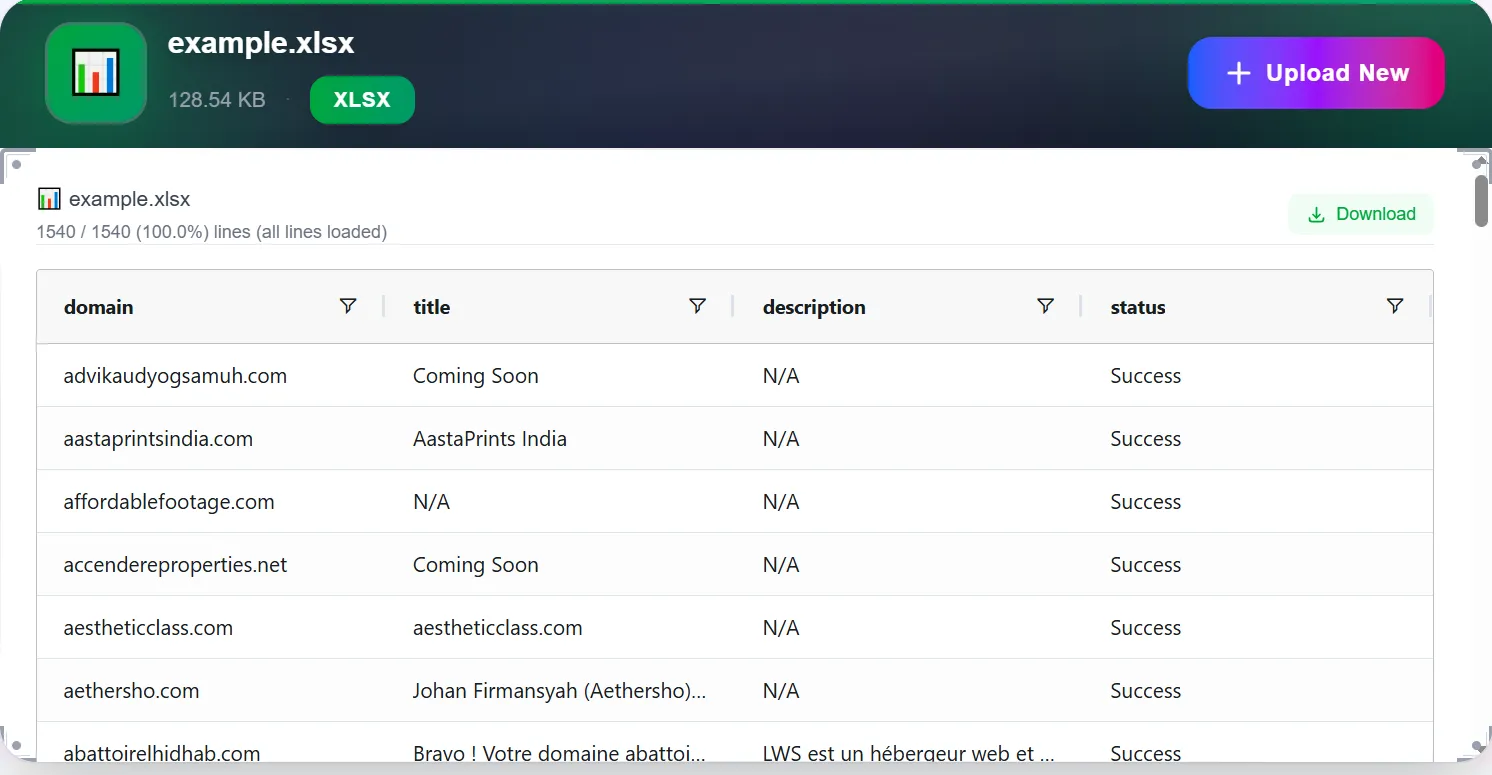
View Your Spreadsheet
Your file will be processed instantly and displayed with:
- ✓All worksheets accessible via tabs
- ✓Cell formatting preserved (fonts, colors, borders)
- ✓Formulas and values displayed correctly
Conclusion
Opening Excel files online doesn't require expensive software or complicated installations. Whether you need to quickly check a spreadsheet's contents or perform detailed analysis, online tools provide convenient, secure, and free alternatives to traditional desktop applications.
Our platform ensures you can view your XLSX and XLS files instantly while maintaining complete privacy and security. No software to download, no accounts to create—just simple, fast file viewing when you need it.